Learning TurboCad
Cad Classes, training, discussions, and such · 19 of 19 known posts recovered
Based on advice I read here, I'll upgrade my old TurboCad to the latest version and finally learn to use it. I tried to figure out my version 11, but was bewildered. I've used a couple of 2D programs and a little AutoCad, but I think I need some adult supervision to learn TurboCad. IMSI has a tutorial for $130. Would you recommend that?
Howard Rush
Bellevue, WA
Absolutly, I would highly recommend the tutorial.
I'm wondering why everything is spinning around?
John Miller
Thanks, John. I'll get it.
Howard Rush
Bellevue, WA
I have owned TurboCad since the version 11 days and never learned to use it. In January, I finally got a new computer, but, alas and alack, my old AutoCads wouldn't run on the 64 bit machine. So, once again I upgraded my Turbocad to 16 Pro. I fiddled with it and learned to do 2D stuff with it fairly well. The biggest problem I have with it is remembering which icons are hidden where under the masters. It's slower to use than AutoCad because you have to find the aforementioned icons and the program doesn't have shortcut keys like AutoCad. I did buy hte instruction manuals a couple fo months ago because I want to learn the 3D side of things. IMSI had tehm on sale for $80 when I got mine. I'm not sure whether that price is still available, or not. I have gotten to where I like the program, but I've also recently acquired AutoCad LT 2008, so now I'm not sure which one I will use for my primary CAD work.
Bare
>Based on advice I read here, I'll upgrade my old TurboCad to
>the latest version and finally learn to use it. I tried to
>figure out my version 11, but was bewildered. I've used a
>couple of 2D programs and a little AutoCad, but I think I need
>some adult supervision to learn TurboCad. IMSI has a tutorial
>for $130. Would you recommend that?
Howard;
Compared with v11, I haven't seen much difference in functionality for what we do in modeling compared to v16. I suspect that the 3D modeling has gotten better, and if that is the case and you want to do generate surfaces for sectioning or the like, it might be worth the plunge.
V/r
Bob
I took the plunge and got TurboCad 16 and the tutorials, which are in actual paper books. IMSI had a package deal.
I hope it's easier than it looks! Thanks for the advice,
Howard Rush
Bellevue, WA
I know it can look daunting, with all the books, but, take it like they teach, one step at a time.
They should have lessons outlined. They teach one or two concepts at each lesson. You'll be an expert in no time Howard.
I'm wondering why everything is spinning around?
John Miller
Hi John,
In TurboCAD hold down the shift+Ctrl keys and then you can pan around. Also, if you right click with your cursor in the blank area in the upper right area the 'Customize' menu pops-up. Then click on "Pop-up Toolbars". Then pick on the three "Popups" "Window and Snap Modes". Now when your drawing twists right click the mouse and look for the cubes in the cursor menu and pick on the left cube and this will straighten the drawing.
Hope this helps.
Roger
>I took the plunge and got TurboCad 16 and the tutorials,
>which are in actual paper books. IMSI had a package deal.
>
>I hope it's easier than it looks! Thanks for the advice,
I liken the process to learning a new language. Your native tongue is always the easiest. I learned AutoCAD years ago, so translating back and forth between TurboCAD and AutoCAD can, at times, be problematic. TurboCAD does have some features that I truly like, especially when generating root and tip ribs and then sectioning for laser cutting that standard AutoCAD can not do easily (or at all).
If you have experimented or used Autocad in the past and are familiar with the commands, there is a free for non commercial use work alike (almost clone) out there called ProgeCAD. You can download a fully functional version called ProgeCAD 2009 Smart! from their web site by going to
http://www.progesoft.com/en/smart-2009#downl . Works great and doesn't have some of the stability problems the previous version had.
I keep both ProgeCAD and TurboCAD on my CAD system. It is pretty easy to go between one program or the other as long as you have an organized file naming/numbering convention.
V/r
Bob Kruger
Now you tell me. Now Fry's has TurboCad on sale for peanuts, too.
Any AutoCad in my head has evaporated, as have Spanish and Japanese, so it wouldn't have been that much of a head start.
Howard Rush
Bellevue, WA
>Now you tell me. Now Fry's has TurboCad on sale for peanuts,
>too.
>
>Any AutoCad in my head has evaporated, as have Spanish and
>Japanese, so it wouldn't have been that much of a head start.
I thought the same when I got into doing my own drawings for models. I had learned under the old AutoCAD 10 and 12, which were not as GUI friendly as what we have now. It had been a few years since I had touched either. The first CAD program that I used once I started on my own plans was TurboCAD. It is capable, but did not feel (to me) as intuitive as AutoCAD. I finally took the plunge and got a copy of AutoCAD, and after a couple of weeks, it started coming back to me. That, plus the help of a lot of folks out there who had formal AutoCAD training, really helped in productivity. Amazingly, I still learn new tricks all the time.
Both are capable. And, if you do work that will be used for laser cutting, each has qualities that make knowing the best of both worth while. ProgeCAD allows you to do have that AutoCAD functionality without the cost, especially when you can use the LSP routines that help optimize various entities for laser cutting.
Best of luck.
V/r
Bob Kruger
Although this doesn't get looked at much, I'll add a comment. I finally got around to slogging through the TurboCad tutorial. In my opinion, the tutorial sucks, particularly the paper manuals, which merely are printouts of the on-screen instructions. TurboCad itself is OK.
Howard Rush
Bellevue, WA
Howard,
Check out the Training products section on TurboCad.
http://www.turbocad.com/TurboCAD/TurboCADWindows/Training/tabid/558/Default.aspxI am trying to learn this also. The 2D Training CD that I got with Version 11 just hits the high spots, so I need more. There are three sets listed; 2D Training for TurboCad, Cad Fundamentals, and Mastering TurboCad. I called and asked them which one since I am a novice. They waffled. Try them and see what they say to you.
I am using V-15 now, but have V-18 ready to load.
Maybe we can resurect this site.
GUY BLANKINSHIP
AMA 14272
Guys,
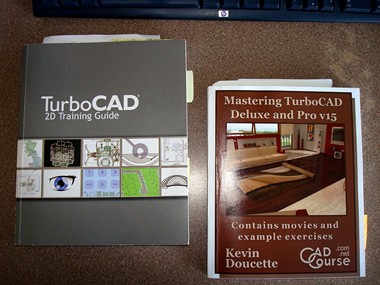
In my attempt to learn how to use TurboCAD 15, I purchase the two
manuals shown in the accompanying photo. Both came from the TurboCAD site, and show in the link that Guy posted.
I got serious and carefully started to work my way through the manuals. The books appear to be good, but alas, my progress, instead of being measured in meters, was measured in microns !!
My conclusion was that it was nearly impossible to learn something this complex on your own, just by studying the manuals. My only hope was to find a course presented somewhere, and learn that way.
I have been unable to find any CAD course that is being taught in an 'adult ed' level. Some junior college level course are available, but at a cost of several hundred dollars.
Good luck.
Warren Wagner
 Attachment
#1, (jpg file)
Attachment
#1, (jpg file)
Sorry to hear that. Very interesting. I have made up my mind to get the one called "Cad Fundamentals 2D Training". Will take awhile to get it and get through some of it. Will keep y'all posted as to progress.
GUY BLANKINSHIP
AMA 14272
Shucks, I wish I'd been more specific. The "2D Training Guide" is one of those that I have, but yours may be a later edition. Just load the tutorial CD and forget the book. You'll see what I mean. The 2D seems better than the 3D, but when you see something that doesn't match TurboCAD, check TurboCAD Help to see if it applies only to the Pro version; the tutorial doesn't mention that. Also, some have reported that the template is missing. It's there, but may appear in a different folder than you expect.
"Mastering" and the "Fundamentals" books appear to be written by other people, so they may be fine.
Howard Rush
Bellevue, WA
Guys,
Here is an on-line training CAD course that might be of interest:
http://www.wingsontheweb.com/wow_cad_class.phpIt is based on TurboCAD 15, and the cost is $59.95. I only know what can be read on this page...does look interesting, though.
Cheers.
Warren Wagner
Here are three sets of videos on Youtube. Have only glanced over them, but seem to be helpful.
http://www.youtube.com/watch?v=Z9dgBt6_IRohttp://www.youtube.com/watch?v=BEwWqNdGodYhttp://www.youtube.com/watch?v=86pnJjpLUdcThey are titled Basic, Mid level, and Advanced.
GUY BLANKINSHIP
AMA 14272
I bought the Cad Fundamentals CD from TurboCad. It is a tutorial and lessons. I am not through with the tutorial but am impressed so far. It is easy to understand, but hard to remember it all. At this pace, I will complete my "world beater" sometime late next year.
GUY BLANKINSHIP
AMA 14272
